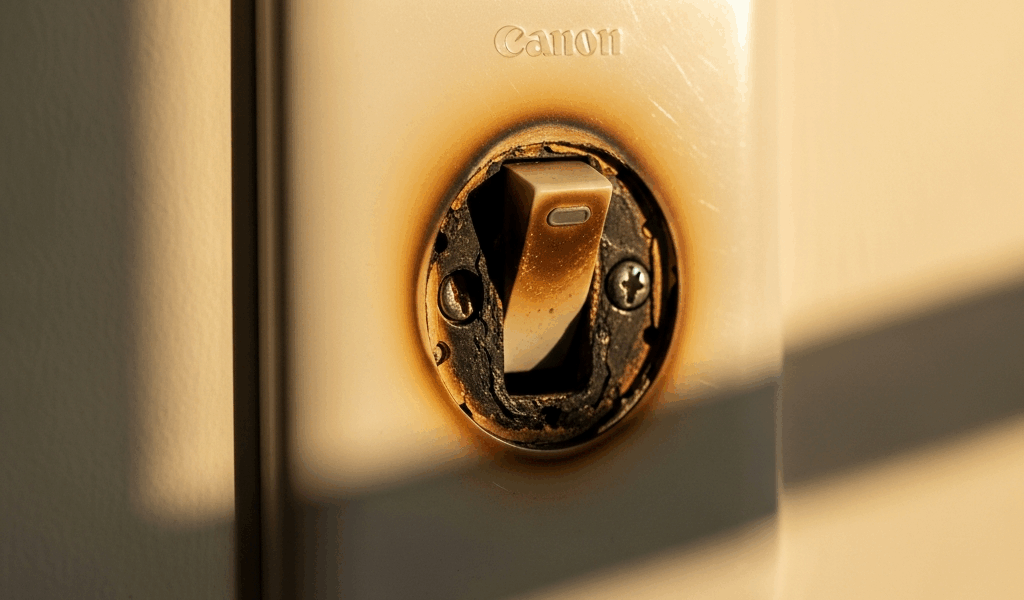
A standard on/off light switch should not be hot. Stop using it and arrange an electrical inspection if the switch or wall plate is uncomfortably hot, discolored, melted, crackling, buzzing, giving off a burning odor, shocking you, or causing a breaker to trip. Turn off the circuit at the breaker if you can identify it safely, and do not remove the wall plate or touch the wiring.
An electronic dimmer is different: some dimmers normally feel warm while operating because they dissipate a small amount of heat. Warm does not mean every temperature is safe. The dimmer must match the lamp type, remain within its rated load, and be installed as its manufacturer specifies.
Is a hot light switch dangerous?
It can be. The Electrical Safety Foundation International lists a hot wall plate, discoloration, unexplained flickering, crackling or buzzing, repeated breaker trips, odor, looseness, and shock as warning signs. Its guidance is to have a qualified electrician inspect warm switches or outlets and other signs of an overload or wiring problem.
Do not wait for smoke or a failed breaker. Heat can come from a poor connection or damaged component inside the box, where the problem is not visible. A switch that has cooled after being turned off may still need repair.
What to do right now
- Stop operating the switch. Do not keep toggling it to see whether the symptom returns.
- Keep people away from it. Do not touch the plate again if it is hot, damaged, making noise, or giving a shock.
- Turn off the correct breaker if you can do so safely. Do not open the electrical panel cover or remove the switch plate.
- Watch for an active emergency. If there is smoke, flame, active sparking, or a strong burning odor, leave the area and call emergency services from a safe location.
- Call a licensed electrician. Describe whether it is a standard switch or dimmer and report heat, sound, odor, discoloration, flicker, shock, or breaker behavior.
Turning off the breaker reduces immediate exposure, but it does not diagnose or repair the underlying fault. Leave the circuit off until it has been evaluated when the switch is truly hot or shows another warning sign.
Why a light switch may get hot
Several conditions can create heat. These are possibilities for a qualified electrician to test—not a basis for opening an energized or potentially energized wall box yourself.
Loose, damaged, or improperly made connection
A poor connection can create localized heating and arcing. The cause may be a loose terminal, damaged conductor, unsuitable connection method, corrosion, or a device not rated for the wiring. The U.S. Consumer Product Safety Commission specifically identifies warm switch plates and a burning-plastic odor as trouble signs in homes with aluminum wiring and advises seeking expert help.
Correcting a connection requires identifying conductor material, device rating, condition, termination method, and manufacturer torque requirements. Simply turning a screw “a quarter turn” is not a safe universal repair.
Worn or damaged switch contacts
Mechanical contacts can deteriorate. A switch that feels loose, works intermittently, flickers, crackles, or fails to operate consistently may need replacement. Continued operation can make a damaged connection worse.
Incorrect switch or dimmer rating
A control must be rated for the connected lighting load and lamp type. LED, incandescent, fluorescent, magnetic low-voltage, electronic low-voltage, fan, and motor loads are not interchangeable. A dimmer that is incompatible with the lamps may flicker, buzz, shut down, or overheat.
Multi-gang installations can also change a dimmer’s allowed load. Some manufacturers require derating when heat-sink sections are removed or several controls share one box. The specific product instructions—not a generic wattage rule—determine the limit.
Wiring fault elsewhere on the controlled circuit
A damaged cable, incorrect splice, or fault at a controlled fixture can contribute to heat or repeated trips. Plugging a space heater into a bedroom receptacle does not automatically send that heater’s current through the room’s light switch; the actual circuit and switching arrangement must be traced. That is why diagnosis should be based on testing rather than assumptions about everything sharing the breaker.
Can a dimmer switch feel warm normally?
Yes. Solid-state dimmers convert a small portion of the connected lighting power into heat. Lutron’s technical guidance says its wallbox dimmers may normally make the wall plate feel warm while on, with temperature influenced by connected wattage and installation. It also stresses that the product’s load limit must not be exceeded.
Warmth alone may therefore be normal for a compatible, properly loaded dimmer. Stop using it and request inspection if it is painfully hot, has changed from its usual behavior, smells burnt, discolors the plate, makes abnormal crackling or popping, flickers unexpectedly, shocks you, or trips the breaker. If you do not know the model or load rating, an electrician can verify both.
Hot switch versus warm switch: a practical distinction
| Observation | Recommended response |
|---|---|
| Standard toggle switch feels noticeably warm or hot | Stop using it and schedule an electrical inspection. |
| Electronic dimmer feels mildly warm only while lights are on | Check the manufacturer’s instructions and load rating; monitor for other warning signs. |
| Any switch is very hot, melted, scorched, odorous, crackling, popping, or shocking | Stop use, shut off the circuit if safe, and obtain urgent professional help. |
| Lights flicker or breaker trips when the switch operates | Leave the switch off and have the circuit inspected. |
| Heat continues or appears when the control is off | Turn off the breaker if safe and arrange prompt inspection. |
Touch is not a calibrated temperature test, and there is no single homeowner-safe surface-temperature cutoff that applies to every switch and dimmer. The product type, rating, load, wall-box arrangement, ambient temperature, and warning symptoms all matter.
Why this is not a good DIY diagnostic
A non-contact voltage detector can be useful as an initial screening tool, but it does not prove that every conductor in a box is de-energized. Multi-wire circuits, travelers, shared neutrals, mislabeling, induced voltage, wiring errors, and tester limitations complicate the job. Electrical professionals use an appropriate test method and verify the tester before and after testing.
Do not remove the switch, tighten terminals, replace the device, or reach into the wall box based solely on a pen-style detector staying silent. ESFI recommends professional switch installation and qualified inspection when warning signs appear.
Information to give the electrician
- Whether the device is a plain on/off switch, dimmer, timer, smart switch, or fan control
- Whether heat occurs only while the load is on or also while it is off
- Which lights, fans, or fixtures the control operates
- Any crackling, buzzing, popping, odor, discoloration, melting, flicker, shock, or breaker trip
- Whether the symptom began after changing bulbs, fixtures, controls, or other electrical work
- Whether the home is known to contain aluminum branch-circuit wiring
This information helps the electrician bring the right replacement controls and determine whether the problem is limited to the switch or requires a broader circuit inspection.
Frequently asked questions
Should a regular light switch be warm?
A basic mechanical switch generally should not produce noticeable heat in normal service. Treat warmth—especially with odor, sound, flicker, discoloration, shock, or tripping—as a reason for inspection.
Why is my dimmer switch warm?
Electronic dimmers dissipate some heat during normal operation. Verify that the dimmer is compatible with the lamp type, within its rated load after any required derating, and free of other warning signs.
Can a hot light switch cause a fire?
Overheating and arcing can damage insulation and surrounding materials, so a truly hot or damaged switch should not remain in use. Shut off the circuit if safe and have it inspected.
Can I tighten the switch wires myself?
That is not a safe universal fix. Correct work depends on conductor material, termination type, device rating, torque, wiring configuration, and verified de-energization. Use a licensed electrician when the switch has overheated.
What if the wall plate is melted or brown?
Stop using the control. Turn off the circuit if safe, do not remove the plate, and arrange urgent professional inspection. Smoke, flame, or active sparking is an emergency.
Bottom line
A hot standard light switch is a warning, not a normal inconvenience. Stop using it, shut off the circuit if that can be done safely, and have a licensed electrician inspect it. Mild warmth can be normal for some properly installed dimmers, but the model’s compatibility and load instructions govern—and heat paired with odor, damage, abnormal noise, flicker, shock, or breaker trips always deserves prompt attention.
Safety sources
- Electrical Safety Foundation International: switch warning signs
- Electrical Safety Foundation International: overload and wiring warning signs
- U.S. Consumer Product Safety Commission: aluminum-wiring trouble signs
- Lutron: wallbox dimmer heat and load limits
Flicker without abnormal heat can point to lamp compatibility, load range, wiring, or control settings. Use the dedicated dimmer-switch flicker troubleshooting guide to separate those causes.



Stay in the loop
Get the latest northwest electric pros updates delivered to your inbox.