Why Your Outlets Stop Working After Power Outage
I came home after a three-day ice storm knocked power out across my neighborhood, expecting everything to flick back on. Instead, half my outlets remained dead. Probably should have opened with this section, honestly—I didn’t know that power restoration and outlet restoration are two completely different things. That’s what makes this problem so endearing to frustrated homeowners like me, and it’s what prompted me to dig into why your outlets stop working after a power outage and what you can actually do about it without calling an electrician at $150 per service call.
What Usually Happens When Power Returns
When the power grid comes back online after an outage, electricity flows to your house. But here’s the thing—your outlets don’t automatically resume normal operation. So, without further ado, let’s dive into what’s actually happening behind the walls.
During a power outage, the voltage in your electrical system fluctuates wildly. Some circuits surge when power restores. Others drop and stabilize slowly. Your circuit breakers are designed to trip—basically turning off—when they detect abnormal current. Think of it as an automatic kill switch. The problem: these breakers don’t reset themselves.
Worse, you might have GFCI (ground fault circuit interrupter) or AFCI (arc fault circuit interrupter) outlets on those dead circuits. These are smart outlets that detect dangerous electrical conditions and shut down fast. They also don’t reset automatically. So even though power is back in your house overall, specific outlets and entire circuits can remain offline until you manually reset them.
Most homeowners don’t realize this is normal. You’ll notice lights work in some rooms, but your kitchen counter outlets are dark. Your bedroom lamp is on, but the outlets near the bathroom are dead. That’s not a wiring failure—that’s protection devices doing exactly what they’re supposed to do.
Step 1: Check the Outlet for a Reset Button
Start here, honestly. Many outlets have built-in reset buttons you won’t see unless you know where to look.
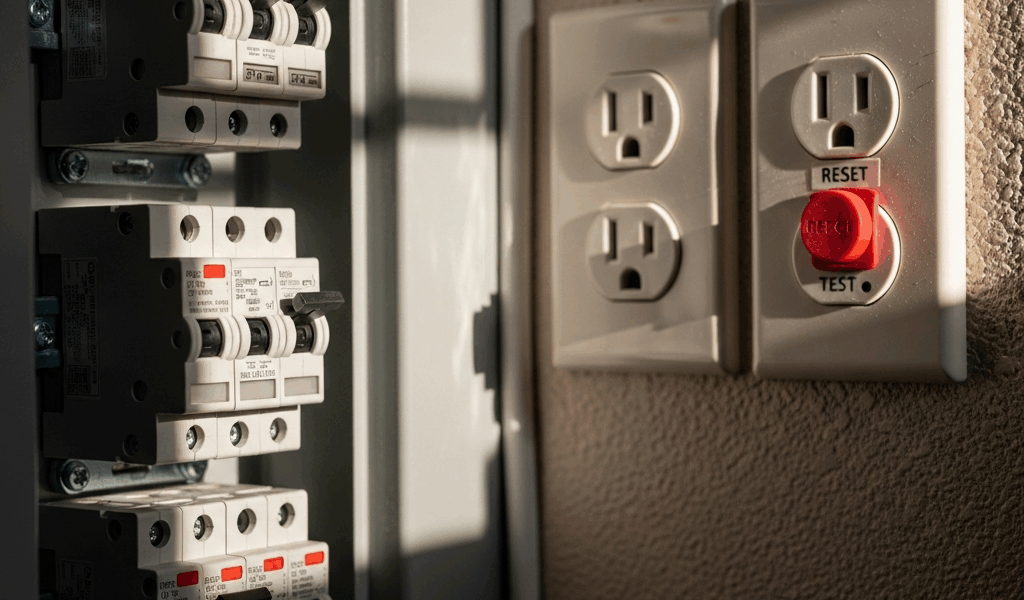
Walk to the first dead outlet. Look at its face directly. A standard outlet has two vertical slots (hot and neutral). A GFCI outlet looks slightly different — it has a larger border and two small buttons in the middle, usually labeled RESET and TEST.
The RESET button is typically black or red. Press it firmly. You should hear or feel a small click. The outlet should light back up immediately if it’s the issue.
Here’s what I missed the first time: not all GFCI outlets look identical. Some have the buttons on top, some on the side. Some modern ones — particularly the newer Leviton and Pass & Seymour models — are nearly flush to the outlet face. Run your finger across the outlet plate. If you feel button-like protrusions, you’ve got a GFCI.
After pressing RESET, plug a lamp or phone charger into the outlet to test it. If power flows, great — move to the next dead outlet and repeat. If it’s still dead, the breaker itself has tripped, and you’re moving to Step 2.
Step 2: Walk Your Electrical Panel and Reset Tripped Breakers
Your electrical panel is the metal box, usually on a basement wall, garage, or exterior wall. You know the one. Open it carefully — the panel itself isn’t dangerous if you don’t touch the main lugs, but don’t poke around inside.
A tripped breaker is unmistakable once you know what you’re looking for. Individual breakers are small switches lined up in columns. Normal breakers point straight up (ON) or straight down (OFF). A tripped breaker sits in the middle position, like it’s caught between two states. Some are slightly out from the row.
You’ll likely see several breakers in this middle position. This is normal after an outage.
Here’s the reset procedure: locate the first middle-position breaker. Flip it fully downward to OFF. Wait two seconds. Then flip it fully upward to ON. You’ll feel resistance — that’s normal. Never force a breaker. If it won’t move or feels stuck, skip it and move to the next one. A stuck breaker means you need an electrician, and that’s non-negotiable.
After resetting each breaker, go back to the house and test the outlets on that circuit. If they’re working, label that breaker for reference — use a label maker on the panel or a note on your phone. This saves time in future outages.
If a breaker trips again immediately after you reset it, stop. This signals a short circuit or ground fault on that circuit. Flip it back OFF and move to the “When to Stop” section below.
Step 3: Identify Outlets on AFCI Protection
AFCI outlets are trickier than GFCI, and they frustrated me for the longest time. They look nearly identical to standard outlets at first glance, but they protect against arc faults — dangerous electrical sparks inside walls that can cause fires.
AFCI outlets became code-required in 2008. That was 2008. If your house was built after that, you likely have them. Building codes typically mandate AFCI protection in bedrooms, living areas, and family rooms. Kitchens and bathrooms usually have GFCI instead, which protects against water contact.
The easiest way to spot an AFCI outlet: look for a label printed on the face that says “AFCI” or “ALARM.” Some say “AFI Protection.” If there’s no button, it’s a standard outlet — the AFCI is somewhere upstream in your circuit, protecting multiple outlets.
When AFCI protection is at the breaker level (which is increasingly common in modern homes built after 2015), you won’t see anything different at the outlet. The breaker itself handles arc detection. If a breaker labeled “AFCI” in your panel trips after an outage, reset it using the method in Step 2. If it trips again immediately, you’ve got a real problem — skip to “When to Stop.”
When to Stop and Call an Electrician
Not every post-outage electrical issue is a simple reset. Know when you’re beyond DIY territory.
Red flag one: The breaker trips again within seconds of resetting it. This means there’s an active short circuit or ground fault on that circuit. Flipping it again just wastes your time and risks equipment damage. Turn it OFF and call someone licensed.
Red flag two: Multiple breakers are tripped in your panel, and resetting them all doesn’t restore power to large sections of your house. This could indicate a problem at your utility connection, damage to the main panel, or a severe issue with your home’s wiring. Test outlets in different rooms. If your kitchen is fine but your entire second floor is dark after you’ve reset all breakers, something bigger happened during the outage.
Red flag three: You smell burning, hear buzzing from outlets, or feel heat radiating from a breaker or outlet. Kill power to that circuit immediately — flip the breaker to OFF. Do not investigate further. This is a fire hazard.
Red flag four: A breaker won’t move or feels stuck when you try to flip it. Forcing it could break internal components. Leave it alone.
Red flag five: You reset everything correctly, but outlets in one specific room remain dead while others throughout the house work fine. This usually means a tripped AFCI protecting only that room, which you’ve already reset. If they’re still out, there’s a wiring issue in that circuit — call a pro.
I learned this the hard way after my outage: resetting breakers and outlets gets you maybe 80 percent of the way there. If you hit any of these red flags, you’re in the remaining 20 percent where electricity becomes genuinely dangerous. An electrician visit costs money, sure, but it’s cheaper than a house fire or electrocution. Don’t make my mistake.
One more practical note: after you’ve successfully reset everything, plug in a few devices to make sure they’re working properly. Computers, refrigerators, and sensitive electronics sometimes need a full power cycle to come back online. That’s not an electrical problem — that’s just how devices work after losing power.



Stay in the loop
Get the latest northwest electric pros updates delivered to your inbox.