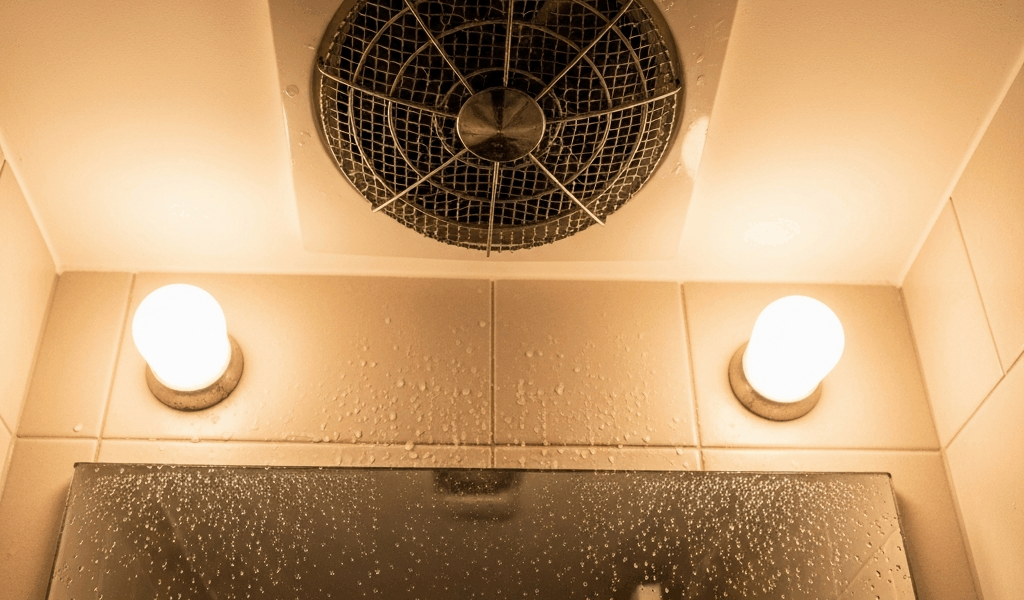
If a bathroom fan will not turn off, do not assume it is broken. Many modern fans and wall controls intentionally continue running because of a humidity sensor, delay timer, occupancy sensor or whole-house continuous-ventilation setting. Find the model number and read its manual first. If the fan runs indefinitely despite a dry room and the documented settings, the likely causes narrow to a control setting, persistent moisture, a stuck or incompatible wall control, incorrect wiring, or a failed sensor or relay.
Stop immediately if you notice heat, a burning smell, buzzing or crackling, visible damage, water inside electrical equipment, or a breaker that trips. Switch the circuit off without opening the fan or wall box and contact a licensed electrician.
Bathroom fan will not turn off: quick decision table
| What the fan does | Most likely explanation | Safe next check |
|---|---|---|
| Runs 20–30 minutes after a shower | Normal humidity or delay-timer cycle | Wait for the documented cycle to finish and compare it with the model manual |
| Runs at low speed all the time, then speeds up during a shower | Continuous ventilation with humidity boost | Check whether the model has multi-speed or whole-house ventilation settings |
| Starts even when nobody uses the bathroom | Humidity change, occupancy control, scheduled cycle, or shared ventilation control | Note weather, HVAC operation and the control indicators; identify the exact control model |
| Runs for hours after the room is dry | Sensitivity/timer setting, trapped humidity, dirty sensor, control fault, or wiring fault | Confirm room humidity and follow only the model-specific cleaning and setup instructions |
| Wall switch has no effect at any time | Master power/continuous mode, incompatible control, wiring issue, or failed relay | Do not open the wall box; have the control and wiring evaluated |
1. Identify the fan and wall control
Remove only the information you can access without exposing wiring. Look for a model label on the grille edge, inside a serviceable cover described by the manual, or on the wall control. Photograph the label and every switch position. Search the manufacturer’s support site for the exact installation and operation manual.
The wall switch may not be a simple on/off switch. Broan-NuTone and Panasonic both sell controls that combine humidity sensing, manual override, delay timing and minutes-per-hour ventilation. A manual-off action may therefore begin a countdown or return the fan to a lower continuous speed instead of removing power.
2. Allow the documented delay cycle to finish
A post-shower run-on period is normal. For example, Panasonic’s WhisperGreen Select condensation module activates a 20-minute delay-off timer. Broan humidity-sensing models can have user-adjustable delay periods; one current model family allows 5–60 minutes and is factory-set to 20 minutes.
Time the fan from the point when showering stops and the door is opened. Do not repeatedly toggle the switch while testing. Some controls interpret rapid switch cycling as a manual-on command and deliberately restart the timer.
3. Check whether continuous ventilation is intentional
Some bathroom fans are part of the home’s ventilation design. They operate continuously at a quiet low speed and increase airflow when a person enters or humidity rises. Panasonic describes this behavior for multi-speed WhisperGreen Select configurations. Broan’s Sensaire wall control can also run a fan for a selected number of minutes each hour to meet whole-house ventilation goals.
If the fan never becomes completely silent but changes speed, that can be normal. Do not disable a continuous setting until you understand why it was commissioned. A building professional may have selected it to meet indoor-air-quality or local-code requirements.
4. Measure actual room humidity
A sensor cannot end its cycle if the room remains humid. Use a separate hygrometer away from the shower spray and supply-air register. Compare readings before the shower, immediately afterward and 30–60 minutes later.
Persistent humidity can come from a closed door with no makeup-air path, a blocked or disconnected duct, an exterior damper that does not open, an undersized fan, a long restrictive duct, or moisture entering from another source. A running motor does not prove air is leaving the building.
Hold a single square of toilet tissue near the grille without touching it. If the running fan cannot hold the tissue, airflow may be weak. Do not insert tools or hands through the grille. For a deeper airflow diagnosis, use the bathroom exhaust fan airflow troubleshooting guide.
5. Understand humidity sensitivity and timer settings
Humidity controls do not all work the same way. Some respond to a rapid rise; others use a relative-humidity set point; some use both. Broan’s AE80SL/AE110SL instructions say environmental changes can occasionally start the fan and provide separate humidity and timer adjustments. Panasonic condensation sensors evaluate relative humidity and temperature to anticipate condensation.
Use only the exact model’s instructions. Many onboard adjustments are located behind the grille and require power to be disconnected at the service panel before adjustment. A setting that is correct for one control can be wrong for another. Never probe a live control, defeat a sensor, or substitute an ordinary dimmer.
6. Clean only as the manufacturer permits
Dust on the grille or sensor can affect airflow and sensing. Turn power off at the service panel before maintenance. Follow the manual’s cleaning method; Broan’s current humidity-fan instructions permit gently vacuuming the sensor and grille. Do not spray cleaner or water into the sensor, motor or wall control.
If the grille is removed according to the manual, reinstall it completely before restoring power. Stop if removal exposes wiring or if the fan is mounted where safe access requires a ladder position you cannot maintain.
7. Rule out an incompatible or failed control
A fan that started behaving differently after a switch replacement, renovation or smart-home installation may have the wrong control. Electronic timers and humidity controls can require a neutral conductor and have specific motor-load ratings. Some fans require separate conductors for master power, manual boost, light and sensor functions.
Do not diagnose this by moving wires between terminals. Give an electrician the fan model, control model, wiring diagram and a description of what changed. Our bathroom fan wiring and conductor guide explains why the circuit, equipment instructions and controls must be considered together.
When the fan likely needs professional diagnosis
- The documented delay expires but the fan never changes speed or stops.
- The room is dry according to a separate hygrometer, yet the sensor remains active.
- The wall control is hot, damaged, buzzing, or unresponsive.
- The behavior began after wiring, switch, fan, HVAC or insulation work.
- The breaker trips or the fan cycles erratically.
- The fan runs but airflow is weak and the duct cannot be safely inspected.
- You cannot identify the model or determine whether it provides required continuous ventilation.
An electrician or qualified ventilation contractor can verify voltage, control compatibility, conductor functions, sensor operation, duct airflow and whether continuous ventilation is intentional. That is safer than replacing a working fan or bypassing a control based on symptoms alone.
Frequently asked questions
Why does my bathroom fan stay on for 20 minutes?
A 20-minute delay is common on humidity and condensation controls. Panasonic’s current condensation module uses a 20-minute delay-off timer, and Broan models commonly ship with a 20-minute factory setting. Confirm the exact model manual.
Why does the fan run when the wall switch is off?
The switch may be a momentary command rather than a master disconnect, or the fan may have continuous ventilation, humidity override or a separate master feed. If the manual does not explain the behavior, have the control and wiring checked.
Can cold or humid weather make the fan turn on?
Yes. Humidity and condensation sensors can react to environmental changes, not only showers. Persistent activation still warrants checking the room humidity, sensor setting, airflow and manual.
Should I disconnect the humidity sensor?
No. Do not bypass a safety or ventilation control. Use the documented adjustments or have a qualified professional diagnose the system.


Stay in the loop
Get the latest northwest electric pros updates delivered to your inbox.